Search Text Matches
The following code illustrates how to search texts in a DjVu document.
| searchtxt.cs |
Copy Code |
|---|---|
using System; using DjVu; namespace SearchText { class SearchText { static void Main(string[] args) { // TODO: ADD app's license script here or REMOVE the following line LicenseManager.LicenseScript = "......"; string keyword = args[1]; using (Document doc = new Document(args[0])) { foreach(int i = 0; i < doc.Pages.Count; i++) { Page page = doc.Pages[i]; TextSearcher ts = page.Text.CreateTextSearcher(); for(int pos = 0;;) { TextMatch m = ts.Search(keyword, pos, false, false, false); if(m == null) break; // no more match // match found; m.Start/m.Length is the position of the match. Console.WriteLine("Found: Page {0} {1}-{2}", i + 1, m.Start, m.Length); pos = m.End; } } } } } } | |
Hierarchical Structure
Texts in a DjVu page is stored in hierarchical structure. On each DjVu page, Page.Text returns TextZone object of Page level. The Page level object can contains TextZone objects of Column, Region, Paragraph, Line, Word and Char (larger to smaller order). In general, a TextZone object can contain any TextZone objects of smaller types. In the sample above, Line contains two Word objects and also two Char objects directly.
Sample of an Ideal Structure
The following table is an example of a Line containing a sentence, "Hello, world.\r" in the most ideal form. Some lines may only have Word objects or sometimes Char objects only. In the worst cases, a line does not have any child objects but just contain the all the text directly. Because each TextZone object remembers its location (TextZone.Bounds Property), if there is no hierarchical structure, it is impossible to obtain the location corresponding to the words or the characters.
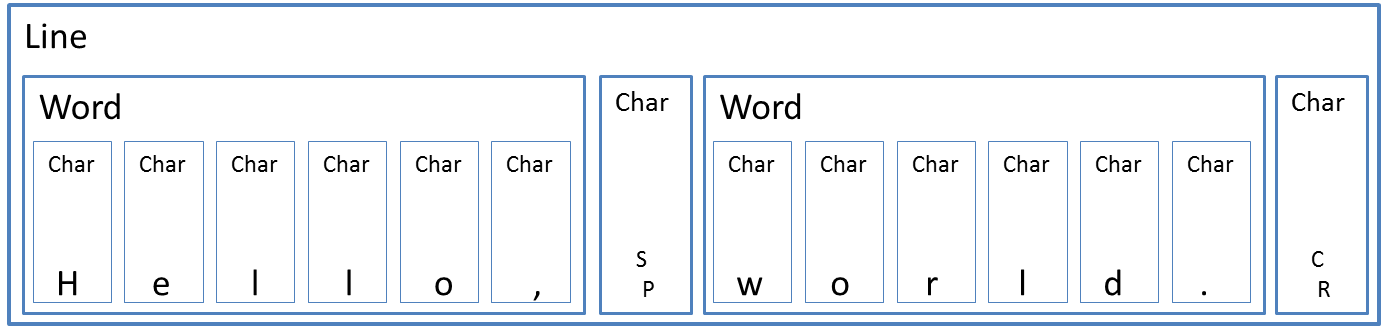
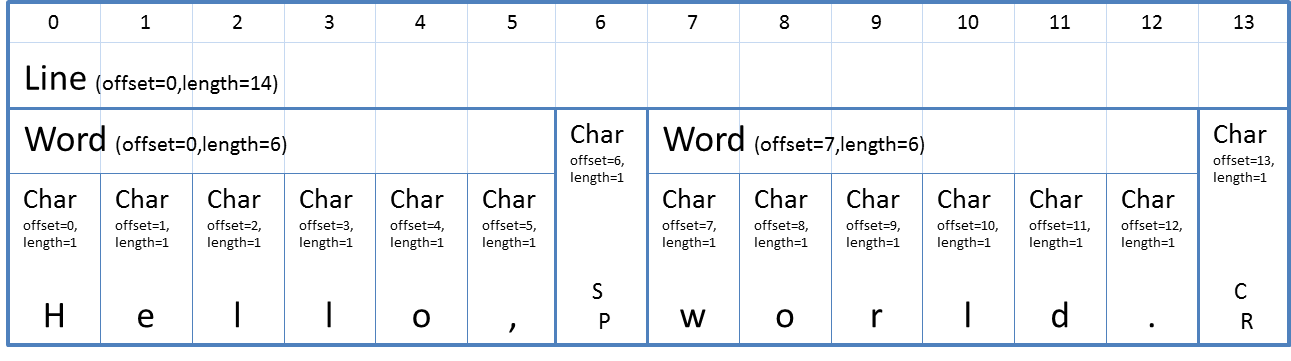
The following table illustrates the same structure a little differently. It shows the correspondence between the TextZone objects and the offsets (in other word, index or address). The first word is placed on offset=0 and the second word is on offset=7. Each word has its own child characters and each character also have its own offset.
TextSearcher is a helper to search the hierarchical structure. The first is obtaining TextSearcher object for the Page.Text. Although TextSearcher provides several search methods, you don't have to use them.
The following code is the first step of the searching process:
| Custom Search Sample (the first-half) |
Copy Code |
|---|---|
// Imagine that tz contains the line introduced above. TextZone tz = ...; // Create a TextSearcher. TextSearcher ts = tz.CreateTextSearcher(); // Search " wor"; the returned index is 6 string word = " wor"; int index = ts.Text.IndexOf(word); | |
OK, now, you can get the index=6 and the word length (length=4). Now we can get TextZone objects corresponding to the index/length using TextSearcher.IndexToZones Method.
The method returns TextMatch object if matching is successful; otherwise null.
| Custom Search Sample (the second-half) |
Copy Code |
|---|---|
// Get TextZones match to the index and the size (index=6, length=4)
TextMatch m = ts.IndexToZones(index, word.Length); | |
Anyway, in this case, it is not null and it contains 4 TextZone objects in TextMatch.TextZones Property; the ones are Char objects corresponding to offset 6, 7, 8, and 9. Because the part "wor" is partially matches to the Word object on offset 6, the object is not included on the result.
And, TextMatch.Bounds Property returns the location of the matched area in rotated coordinates.
Sample of a Simplest Case
It is often the case, but a TextZone object may not have any child TextZone objects but have just a text string. The following TextZone object does not have any children but just have TextZone.Text Property "Hello, world.\r".

In the case, if you search "world", TextMatch.TextZones Property returns the Line level TextZone object because the word "world" is contained in the object and TextZone.A Property indicates the start index inside the TextZone object; in this case, 7. TextZone.B Property is the count of the characters which trails the occurrence; in this case, 2.